Media over QUIC (MoQ) in Action: Multi-Track, Low-Latency Streaming

Updated: Apr 28
As real-time media applications demand lower and lower latency, modern embedded systems are pushing traditional streaming protocols to their limits. If a system carries multiple cameras and different sensors, every frame and every millisecond of the stream matters.
That’s where Media over QUIC (MoQ) comes in as a new approach to address this limitations.
At RidgeRun, we are actively advancing MoQ-based streaming for embedded systems, and with our GstMoQ plugin, we bring MoQ streaming capabilities directly into Gstreamer pipelines. Our latest demo showcases a real-world scenario with multi-track, low-latency video streaming plus synchronized metadata over QUIC.
What is Media over QUIC (MoQ) and Why Does It Matter?
Media over QUIC (MoQ) is an emerging media delivery architecture built on top of the QUIC transport protocol. It is designed specifically for real-time, low-latency, and multi-source media distribution.
Traditional streaming protocols were primarily designed for single video sessions delivered from a server to many viewers. Modern systems, however, especially in robotics, edge AI, and embedded vision, generate multiple media sources at the same time, often combined with telemetry and metadata. MoQ addresses this evolution directly.
Built on QUIC
QUIC is a secure, UDP-based transport protocol that powers HTTP/3. It provides:
Encrypted connections by default (TLS 1.3)
Stream multiplexing within a single connection
No head-of-line blocking between streams
Faster connection setup
Improved congestion control
These transport-level advantages make QUIC an ideal foundation for next-generation media delivery.
A Track-Based Media Model
Instead of treating media as one continuous stream, MoQ organizes content into:
Channels: A channel represents a group of related media
Tracks: Each channel can have multiple tracks. A track is each independent media stream in a channel. A track can represent a camera feed, an audio stream, a telemetry system, metadata of a video or any other media source.
Clients can dynamically subscribe to individual tracks within a channel, enabling selective reception of only the media they need.
This model is particularly powerful in systems that produce multiple simultaneous data streams.
MoQ Architecture Overview
Media over QUIC uses a relay-based architecture to balance scalability and latency. Instead of forcing direct peer-to-peer connections, MoQ introduces relays that form a distributed media delivery network.
The main roles in a MoQ system are:
Publisher: Produces and publishes media content.
Subscriber: Consumes media content.
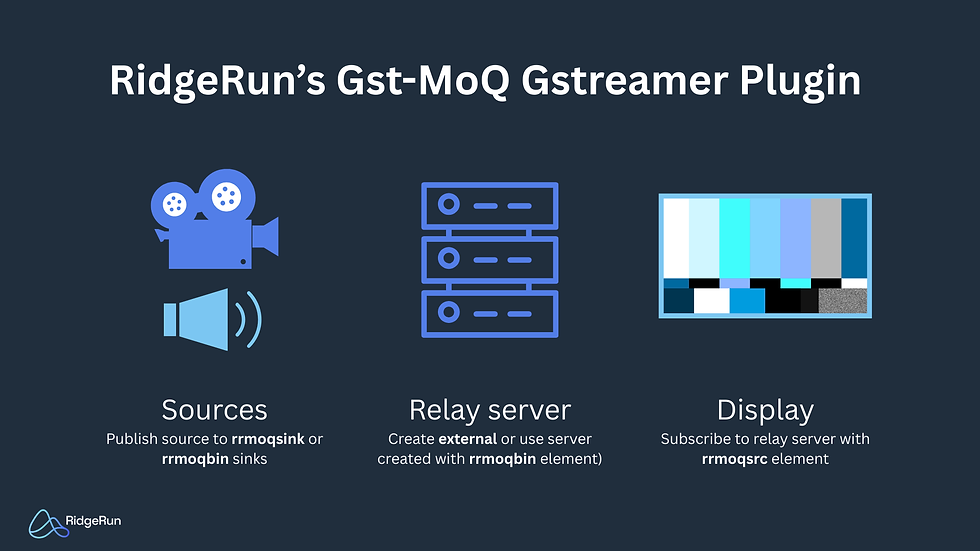
Relay: Routes and forwards media between publishers and subscribers.
Publishers and subscribers do not connect directly to each other. Instead, each connects to a local relay, which participates in a larger relay network.
RidgeRun's Gst-MoQ Library
GstMoQ brings Media over QUIC (MoQ) streaming capabilities directly into GStreamer pipelines, enabling modern, low-latency, and scalable media delivery over QUIC / HTTP-3.
Built with GStreamer developers in mind, GstMoQ integrates cleanly into existing pipelines while exposing the flexibility required to build real-time, distributed media systems.
Gst-MoQ in Action:
To demonstrate MoQ’s capabilities in a realistic environment, we built a MoQ-based streaming system consisting of:
A MoQ Publisher Application
A MoQ Player Application
MoQ Publisher Application
The publisher simulates a robot equipped with multiple cameras and telemetry systems.
Key features:
Configurable track count: Publish multiple video tracks within a single MoQ channel.
At least 4 concurrent video tracks: Each representing a different camera on the robot.
SEI metadata injection on one track: Video stream embeds valid SEI metadata.
Synthetic telemetry module: Simulates robot data such as:
Cam Resolution
CPU Temperature
CPU Usage
Stable long-duration operation: Designed to run continuously for ≥1 hour without interruption.
Consistent metadata updates: SEI metadata is updated at a configurable rate, without stream disruption.
All tracks are published under a single MoQ channel, enabling unified access while preserving per-track independence.
MoQ Player Application
On the receiving side, the MoQ Player showcases the power of dynamic subscription and track management.
Key capabilities:
Channel selection
Track discovery and listing
Dynamic track enable/disable (subscribe/ unsubscribe)
Concurrent multi-track video display
Real-time SEI metadata visualization
The player:
Lists all available tracks for a selected channel.
Allows users to subscribe or unsubscribe from each track dynamically.
Displays all active video tracks simultaneously.
Parses and visualizes SEI metadata in real time.
This is particularly powerful for robotics and remote operation use cases, where operators may:
Switch between cameras.
Monitor multiple viewpoints simultaneously.
Enable additional feeds only when needed.
Inspect telemetry synchronized with video.
For more information, visit the RidgeRun GstMoQ: Media Over Quic GStreamer Plugin wiki.