Event Cameras in Practice: A Faster Path to Prototyping on Raspberry Pi 5 and Jetson Orin NX

What if you could start evaluating an event camera on embedded Linux without first spending weeks on platform bring-up?
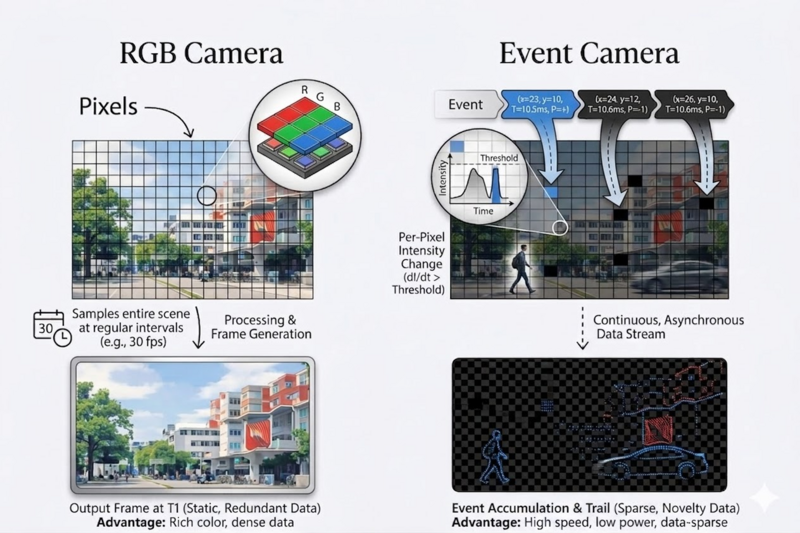
That is the practical problem many teams face. Event cameras are promising for robotics, industrial automation, and low-latency vision. But once you move from theory to implementation, the real questions appear fast. Which platform should you use? How do you get the sensor streaming? What software stack is needed? And how much work is hidden in the driver and integration layers?
This is where RidgeRun can help. RidgeRun’s Event Cameras Developer Guide documents two working paths for the Prophesee GENX320 event camera on embedded platforms: Raspberry Pi 5 and NVIDIA Jetson Orin NX. And for Jetson Orin NX, RidgeRun developed and published the open-source driver support that makes this path available to engineering teams today.
The Problem: Event Cameras Are Interesting, but Integration Is the Real Barrier
Most engineering teams do not get blocked by the concept of an event camera. They get blocked by the integration work around it.
A team may want to test low-latency motion detection, fast trigger response, or event-based perception on an embedded target. But a sensor alone is not enough. The team still needs hardware setup, software installation, runtime configuration, event visualization, and a way to validate that the platform is actually working.
That is why documented bring-up matters. It reduces uncertainty early in the project. It also helps teams move faster from evaluation to a real prototype.
Two Documented Options for Getting Started
RidgeRun’s wiki documents two platform options for the Prophesee GENX320: Raspberry Pi 5 and NVIDIA Jetson Orin NX.
On Raspberry Pi 5, the guide covers hardware setup, software installation, environment configuration, and basic usage with OpenEB tools such as metavision_viewer for live streaming, recording, and replay.
On the NVIDIA Jetson Orin NX, the guide documents the platform flow for the same sensor, including kernel integration, runtime configuration, validation steps, and usage with OpenEB and GStreamer tools. RidgeRun developed and published the open-source driver support for GENX320 on Jetson Orin NX.
A Simple Example: From Sensor Bring-Up to First Streaming Demo
A practical first goal for many teams is simple: connect the camera, confirm the event stream is alive, visualize it, and record a sample for later processing.
That is exactly the kind of workflow the guide enables.
On both documented platforms, engineers can move from hardware setup to running metavision_viewer, inspecting the live event stream, recording RAW data, and replaying captured sessions for testing and development.
For Jetson Orin NX, this becomes more valuable because it shows that the published RidgeRun driver is not just source code in a repository. It is part of a documented integration path that takes the platform from bring-up to usable streaming and demo validation on real hardware.
Why the Jetson Driver Matters
For many embedded teams, Jetson is the more relevant target when they need performance, AI integration, or a stronger deployment path. But without driver support, that choice can create extra risk and delay.
RidgeRun’s published support for the Prophesee GENX320 on Jetson Orin NX reduces that barrier. The guide documents how to apply the RidgeRun kernel patch, build the required modules and device-tree blobs, enable the camera overlay, patch OpenEB, configure the runtime environment, and validate the resulting setup on the target board.
The Jetson driver documentation also covers controls engineers actually need, including transport configuration, event format selection, event rate control, bias tuning, ROI configuration, and pixel masking.
That matters in product development. It means teams can spend less time solving first-stage platform problems and more time working on the application itself.
Benchmarking: What the Platform Delivers in Practice
The blog should not stop at setup. It should also show measured behavior.
RidgeRun’s guide includes Jetson Orin NX latency benchmarking for the GENX320 using a controlled LED stimulus and software-side event detection. The reported average latency was:
9.24 ms at 100 FPS
3.28 ms at 500 FPS
2.56 ms at 1000 FPS
These numbers are useful because they show the platform doing real work, not just loading a driver. They also help engineering teams understand how transport settings affect responsiveness when evaluating the sensor for their own use cases.
How RidgeRun Helps Clients
The open-source Jetson driver is useful on its own. But many teams still need help turning a working demo into product-ready integration.
That is where RidgeRun fits. We can help clients with camera driver work, platform bring-up, OpenEB integration, performance tuning, and embedded vision application development around event-based sensors. The published GENX320 support for Jetson Orin NX gives teams a concrete starting point. RidgeRun engineering can help build the rest of the path from evaluation to product development.
Read the Full Guide
This post is meant to show why the documented platform flow is useful. The full commands, setup steps, driver details, and benchmark data are in RidgeRun’s Event Cameras Developer Guide.
If your team is evaluating event cameras for an embedded product, that guide is the best next step.